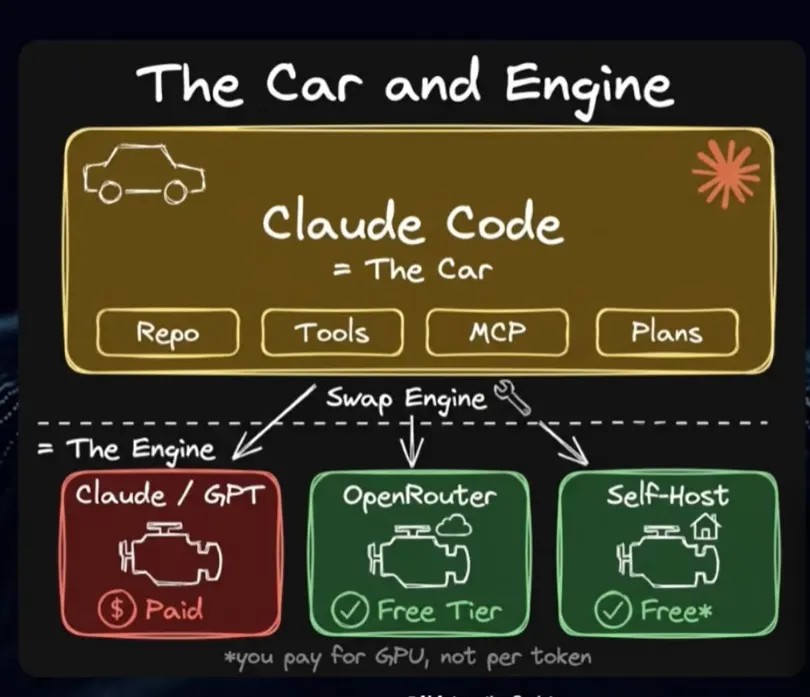
I burned through so much money in Claude API fees before I realized the truth: you can get most of what you need for zero dollars. I was annoyed. You might be, too. You’re paying for convenience, not capability. The secret isn’t a hidden coupon or a sketchy jailbreak — it’s understanding that Claude Code is just a vehicle. You can swap the expensive, proprietary engine for a powerful, free one and keep driving.
🚀 I’m currently open to AI/ML roles, freelance projects, and software development opportunities.
If you’re building something interesting — from intelligent systems to full-stack apps — I’d love to collaborate.📩 Email: markorlando45@gmail.com
💼 LinkedIn: https://www.linkedin.com/in/emmanuel-ndaliro-501771124/*
🧑💻 Upwork:* https://www.upwork.com/freelancers/~01ee00096be90b99d3?viewMode=1*
🎯 Fiverr:* https://www.fiverr.com/users/ndaliro_mark/seller_dashboardNow — let’s talk about how I cut my Claude API costs to (almost) zero.
While everyone argues about whether Claude Pro or ChatGPT Plus is worth it, a quiet shift is happening. Developers are running the exact same Claude Code interface — the same buttons, the same workflow — but they’ve disconnected it from Anthropic’s billing department. They’re getting remarkable results for most daily tasks without opening their wallets.
This guide shows you exactly how they do it. I’ll walk you through two proven methods: one that runs entirely on your own computer for total privacy, and one that uses free cloud models. You’ll get the steps, the specific models to choose, and the trade-offs so you can decide what works for your workflow.
Let’s get your money back.
The Car and Engine: Why This is Possible (And Completely Legit)
First, forget the idea that Claude Code is the AI. It isn’t. Think of it like a car. Claude Code is the chassis, the steering wheel, the dashboard, and the pedals. It’s a brilliant piece of engineering that tells an AI how to organize files, use tools, and execute a plan.
The AI model — like Anthropic’s Opus or Sonnet — is the engine. By default, Claude Code comes with a high-performance, proprietary engine that runs on Anthropic’s servers. Every time you start it, you’re buying fuel (API tokens).
Why doesn’t everyone know this?
Because the default setup is seamless. You download Claude Code, log in with your Anthropic account, and it just works. The swap requires a few configuration changes — nothing complex, but it’s not a one-click option in a menu. It’s a power-user feature.
And no, this isn’t against Anthropic’s terms of service. You’re using their agent framework exactly as designed. You’re just plugging in a different model. It’s like buying a Tesla and, hypothetically, installing a different battery pack. You still own the car.
Open Source vs. Closed Source: The Key Distinction
To understand which engines you can swap in, you need to grasp the core difference.
- Closed-Source Models (Opus, Sonnet, GPT-4, Gemini): The hood is locked. The manufacturer keeps the engine’s blueprints secret. You can only access it through their fueling station (their API), and they charge you per gallon.
- Open-Source Models (Qwen, Gemma, Mistral, Llama): The blueprints are public. You can download the engine design, build it yourself, and run it on your own property. No per-use charges. Ever.
People pay for closed-source models for one reason: they’re better. But that statement needs a huge asterisk in 2024.
The Performance Gap is Now a Crack (And It’s Closing Fast)
Let’s talk numbers. When you look at coding benchmarks like SWE-bench, which tests models on real GitHub issues, the leaders are still closed-source: Opus, GPT-4o, Sonnet 4.6.
But look at the cluster right behind them. Models like Qwen 3.6 and Gemma 4 are scoring within striking distance. The most telling data point? Some of the top free, open-source models today outperform Claude Sonnet 3.7.
Remember when Sonnet 3.7 launched? It was state-of-the-art. It’s what everyone used. Today, you can run a model on your laptop that beats it. That’s how fast this field is moving.
For the absolute hardest, most critical tasks where a single error costs you thousands, Opus or GPT-4 might still be your choice. But for the vast majority of development work — writing a function, refactoring a module, explaining code, generating documentation — the free alternatives are not just “good enough.” They’re excellent.
Why might a free model seem worse at first?
It’s usually a setup issue, not a capability issue. Imagine trying to put a motorcycle engine in a pickup truck. You might have connection problems.
1. Tool Training: Claude Code uses specific tools. A model not trained on those tools might fumble.
2. Context Window: Claude Code’s system prompt is long. A model with a small context window can’t see all the instructions.
3. Protocol Mismatch: The model might not output the exact JSON structure Claude Code expects.
The fix? Choose the right model and configure it correctly. That’s what the methods below are for.
The trend is undeniable. Look at Google’s recent release of Gemma 4. When plotted by size (parameters) versus ability (Elo score), Gemma 4 models have the highest scores at the smallest sizes. Smaller size means you can run it on less powerful hardware. The efficiency race is accelerating the availability of powerful free models.
Method 1: Run a Local Model with Ollama (100% Free, Fully Private)
This method takes the AI completely offline. The model runs on your computer’s hardware. No data leaves your machine. No API calls. No bills. Ever.
The Trade-off: You trade convenience for control. You need decent hardware, and inference speed depends on your machine. It’s slower than a cloud API, but for thoughtful coding tasks, the speed is often fine.
Step 1: Install Ollama
Go to ollama.com. Download and install it. It’s a simple installer for macOS, Windows, or Linux. Once installed, it runs as a background service, quietly waiting for you to give it a model to run.
Step 2: Choose & Pull Your Model (This is the Key Decision)
Opening Ollama shows a library of models. The choice can be paralyzing. Don’t overthink it. We want a model that’s good at coding and can fit in Claude Code’s “engine bay.”
For the best advice, we cheat by looking ahead to Method 2. The website Open Router maintains live rankings based on user votes and performance. Check their “Programming” leaderboard. You’ll consistently see Qwen 3.6, MIMO, and MiniAX at the top for coding tasks.
For a local setup, we also care about size. A 7-billion parameter (7B) model is a great starting point for most modern laptops (16GB RAM). If you have a beefier machine with a good GPU, you can go for a 14B or even 32B model.
My recommendation to start: qwen2.5:7b or gemma2:9b. They offer a fantastic balance of capability and manageable size.
To download (or “pull”) the model, open your terminal and run:
bash
ollama pull qwen2.5:7b
Your terminal will show the download progress. A 7B model is about 4–5GB. Go make a coffee.
Step 3: Connect Ollama to Claude Code
Now we reroute Claude Code’s signals to your local engine. The exact steps depend on your Claude Code setup (Desktop app vs. CLI), but the principle is the same.
You need to configure Claude Code to use a custom API endpoint.
- Find Claude Code’s Config. This is often a settings.local.json file or an environment variable setup. For the desktop app, you might need to look in ~/Library/Application Support/Claude Code/ (Mac) or %APPDATA%\Claude Code\ (Windows).
- Point it to Ollama. You need to set the API base URL to http://localhost:11434 (Ollama’s default local port).
- Specify Your Model. You’ll also need to set the model name to match what you pulled, e.g., qwen2.5:7b. The API key field can often be set to a dummy value like ollama.
Example settings.local.json snippet:
json
{
“anthropicApiKey”: “not-needed”,
“anthropicApiUrl”: “http://localhost:11434/v1",
“defaultModel”: “qwen2.5:7b”
}
Note: The exact key names might vary. You may be looking for keys like CLAUDE_API_BASE_URL and CLAUDE_MODEL if using environment variables.
Test it. Restart Claude Code. Ask it to write a simple Python function. Watch the activity light on Ollama. If it works, you’ve just severed the link to paid APIs.
Method 2: Use Open Router as a Gateway (Free Cloud Models)
Don’t have the hardware or patience for local models? Use Method 2. Open Router acts as a universal adapter. It’s a single API that connects to hundreds of AI models, including many top-tier free ones. You get cloud speeds without cloud prices.
The Trade-off: Your queries go to a third-party server (though many providers have good privacy policies). There are rate limits on free usage, but they’re generous.
Step 1: Set Up Open Router
- Create an account at openrouter.ai.
- Critical Step: Add Minimal Credit. This sounds counterintuitive, but listen. With a $0 balance, you get about 50 free requests per day. Add just $5 or $10 to your account, and your free daily requests jump to 1,000. Since free models don’t deduct from your balance, that deposit isn’t consumed — it just permanently upgrades your account tier. Think of it as a one-time $10 fee for a massively better free plan.
- Go to your account settings and generate an API key.
Step 2: Configure Claude Code for Open Router
Again, we’re changing Claude Code’s wiring. This time, we’re sending its API calls to Open Router’s address instead of Anthropic’s.
You need to change two or three settings:
* API Base URL: https://openrouter.ai/api/v1
* API Key: Your Open Router key.
* Model: A free model identifier from Open Router.
Use this in your settings.json inside.claude folder:
{
 "env": {
  "ANTHROPIC_BASE_URL": "https://openrouter.ai/api",
  "ANTHROPIC_AUTH_TOKEN": "your-openrouter-api-key",
  "ANTHROPIC_API_KEY": "",
  "ANTHROPIC_MODEL": "openrouter/free",
  "ANTHROPIC_DEFAULT_SONNET_MODEL": "openrouter/free",
  "ANTHROPIC_DEFAULT_OPUS_MODEL": "openrouter/free",
  "ANTHROPIC_DEFAULT_HAIKU_MODEL": "openrouter/free",
  "ANTHROPIC_SMALL_FAST_MODEL": "openrouter/free",
  "CLAUDE_CODE_SUBAGENT_MODEL": "openrouter/free"
}
🚨 Critical Warning: You must ensure ALL model calls from Claude Code are redirected. Claude Code sometimes makes secondary “tool calls” or uses a different model for planning. If you only change the main chat model setting, you might still get billed for those hidden calls. Dig into the config and set the base URL universally.
Step 3: Pick Your Free Model
You can use the generic openrouter/free endpoint, which automatically picks a model for you. For consistency, I recommend specifying one:
- openrouter/qwen/qwen-3.6-free: My top pick for coding. It’s sharp, follows instructions well, and writes clean code.
- openrouter/google/gemma-4-free: Excellent for analytical tasks and reasoning through problems.
- openrouter/mistralai/minixtral-free: A great all-rounder if you’re doing mixed work.
Test them. Ask each to write a React component or debug a SQL query. See which one “clicks” with your style.
When Do Free Models Actually Win? Real Use Cases.
You wouldn’t use a hatchback to move a sofa. Don’t use a free model for a task it’s bad at. Here’s where they excel:
- Learning & Experimentation: You’re learning a new framework (e.g., Svelte). You can ask endless “dumb” questions, generate example projects, and get explanations without watching a meter tick up.
- The First 80% of Any Task: Brainstorming architecture, writing boilerplate, generating initial function stubs, creating basic documentation. Let the free model do the heavy lifting of creation.
- High-Volume Grunt Work: Formatting 100 files, adding JSDoc comments to an entire codebase, renaming variables for consistency. A free model can churn through this for zero cost.
- Personal & Private Projects: Working on your startup’s prototype? The local Ollama method ensures your proprietary ideas never leave your SSD.
- Your Paid Model’s Assistant: Use the free model as a “junior dev.” Have it research options, draft emails, or summarize documentation. Then bring the final, critical decisions to your paid model. You cut your paid API usage by 70%.
Your Action Plan: Start This Afternoon
Stop planning. Start doing. Follow this sequence:
- Immediate Win (30 minutes): Do Method 2 (Open Router). Create the account, add $10, get your key, and reconfigure Claude Code. You’ll be up and running before lunch is over. Use it for the rest of the day on non-critical tasks.
- Weekend Experiment: If you have a capable computer, try Method 1 (Ollama). Install it, pull the qwen2.5:7b model, and get it connected. Feel the difference of total privacy and instant response (no network lag).
- Build Your Hybrid System (Next Week): This is the endgame. Set up Claude Code profiles or quick config switches.
- Profile “Free”: Points to Open Router’s free Qwen model. Use this for 80% of your work.
- Profile “Local”: Points to your Ollama engine. Use this for sensitive or offline work.
- Profile “Paid”: Points to Anthropic’s API. Use this only for final review, complex debugging, or tasks where the latest knowledge (like a library released yesterday) is essential.
Configure your system so switching is one click or one command. You now have a tiered AI workshop.
The New Reality
You’re no longer a passenger in someone else’s car, paying for every mile. You’re in the driver’s seat. The engine-swap is complete.
The trajectory is clear: the “free” models of today are rivaling the “paid” models of 18 months ago. With tools like Ollama and Open Router, you’re not settling. You’re gaining strategic flexibility, unwavering privacy, and complete cost control.
Your first task? Open a new terminal window. Type ollama pull qwen2.5:7b or go to Open Router and create an account. Do one of them right now. The only thing you have to lose is your next API bill.
Resources
Claude Code - Ollama
Claude Code is Anthropic's agentic coding tool that can read, modify, and execute code in your working directory. Open…
https://openrouter.ai/settings/keys