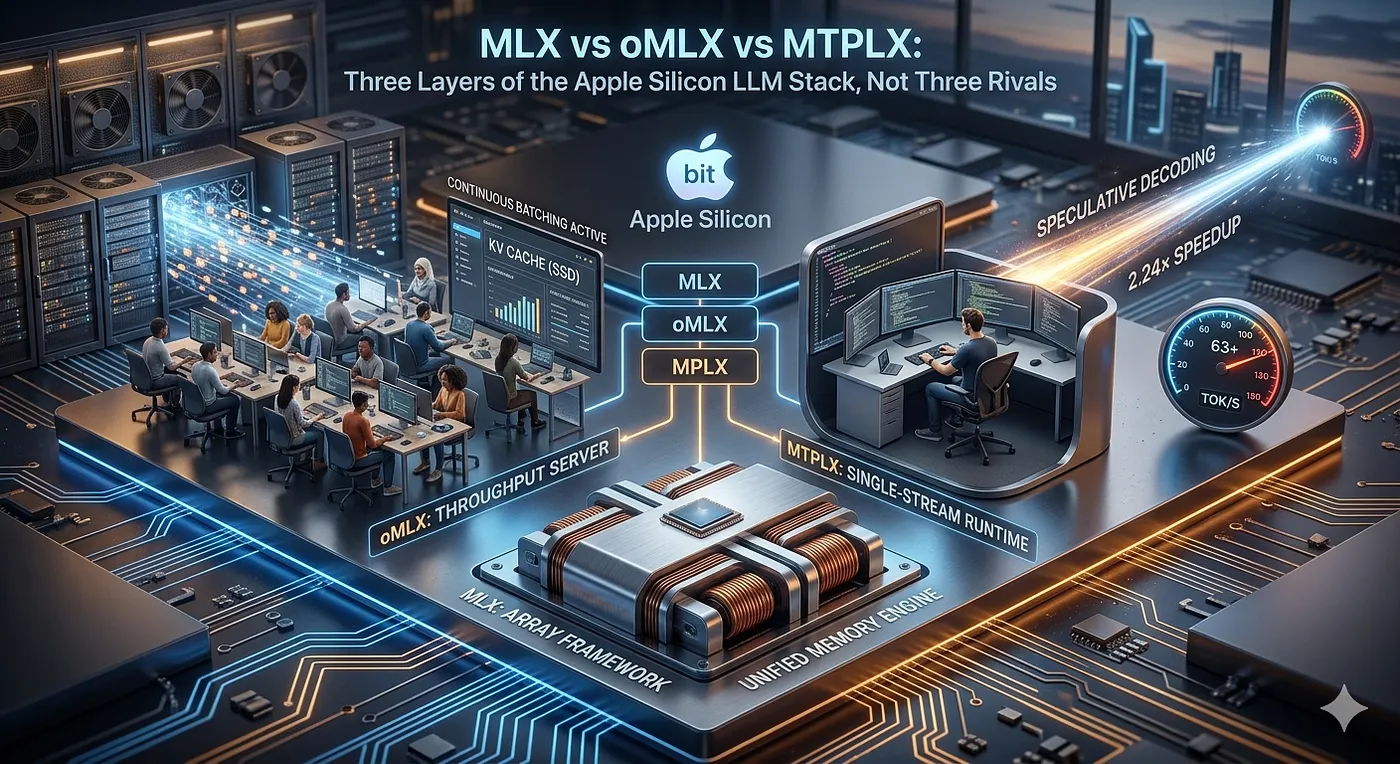
MLX, oMLX, and MTPLX form three layers of the Apple Silicon LLM stack, not three competing tools.
A practical guide to choosing between MLX, oMLX, and MTPLX for running local LLMs on Apple Silicon, and why they solve different problems.
If you can't read this because of the paywall, use this link
The three names look like the same word typed by someone with a stutter. MLX. oMLX. MTPLX. They all run large language models on Apple Silicon, they all advertise speed, they all arrived inside a twelve-month window, and two of them install with a brew command that differs by a single character. So the natural instinct is to line them up as three competitors and ask which one wins.
That instinct is wrong, and acting on it will land you with the wrong tool for your machine. These are not three horses in one race. One of them is the engine. The other two are servers built on that engine, and they pull in opposite directions to solve opposite halves of the same problem. Once you see which half each one owns, the “which should I use” question dissolves into “which wall am I standing in front of?”
A few numbers to anchor the rest of the article. MLX is Apple’s array framework, the raw compute substrate, and both of the others import it. oMLX is an inference server tuned for serving a crowd: continuous batching plus a KV cache that spills onto your SSD instead of falling over when RAM fills. MTPLX is a runtime tuned for a single impatient user: it reports 63.056 tok/s against 28.156 tok/s for plain decoding on a 27B model, a 2.24× speedup, and it does it without loading a second model and without changing a single output token. Same chip. Same models. Three completely different jobs.
Here is the stack drawn out, because the names hide it:
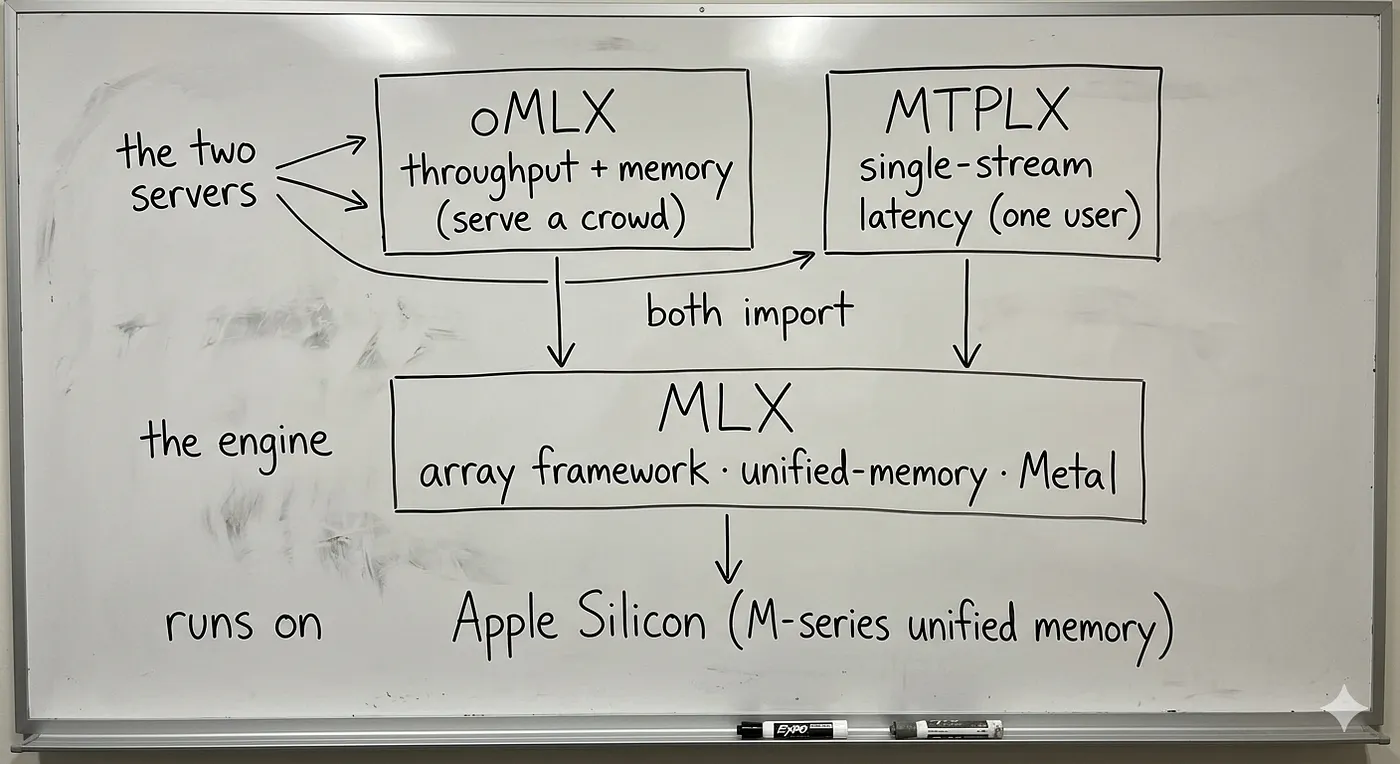
Stack diagram: oMLX (throughput server) and MTPLX (single-stream runtime) both import MLX, the array framework that runs on Apple Silicon unified memory.
oMLX and MTPLX never touch the metal directly. They speak to it through MLX. That single fact is the whole reason a fair comparison treats MLX as the floor and the other two as what you build on it.
MLX: the engine, not a contestant
MLX is Apple’s open-source array framework for machine learning on Apple Silicon, from the ml-explore team. If you have ever written NumPy, the Python API will feel like coming home; the higher-level mlx.nn and mlx.optimizers packages track PyTorch closely enough that porting models is mostly mechanical. Its companion package, mlx-lm, runs thousands of models straight off the Hugging Face Hub. Using it directly is three lines:
from mlx_lm import load, generate
model, tokenizer = load("mlx-community/Mistral-7B-Instruct-v0.3–4bit")
text = generate(model, tokenizer, prompt="Write a story about Einstein", verbose=True)
Or from the shell, with nothing else installed but pip install mlx-lm:
mlx_lm.generate - model mistralai/Mistral-7B-Instruct-v0.3 - prompt "How tall is Mt Everest?"
What makes MLX worth building on is one architectural bet that does not exist on a normal PC: unified memory. On Apple Silicon, the CPU and GPU are not two chips with two separate pools of RAM connected by a bus. They sit on the same die and share one physical pool of memory. MLX leans on this with zero-copy arrays. When the GPU finishes a matmul, the CPU reads the result from the very same address. No copy. No transfer. Nothing crosses a bus.
Picture two cooks. On a Windows or Linux box with a discrete GPU, the two cooks work in separate kitchens at opposite ends of a hallway, and every time one finishes a dish the other needs, a runner has to carry it down the corridor. That corridor is the PCIe bus, and on the busiest workloads, the runners spend more time walking than the cooks spend cooking. On Apple Silicon, there is one kitchen and one shared steel counter. Either cook reaches over and picks up the same bowl. MLX deletes the hallway. Apple reports that the M5’s GPU Neural Accelerators deliver up to 4× faster time-to-first-token over the M4 baseline, and MLX is the layer that lets a model reach that ceiling.
But a framework is a pile of well-machined parts, not a finished machine. mlx-lm will generate text in a loop, and it even ships a BatchGenerator for handling more than one request, but it is not a polished way to run a chatbot for your household or a coding agent on your laptop. The gap between “powerful framework” and “thing I actually run all day” is exactly the gap that oMLX and MTPLX were built to close, and they close it in opposite directions.
Every local LLM slams into one of two walls
Run a model on your own machine, and you hit one of two limits. Which one you hit first decides which server you want, so it is worth naming them precisely.
The first wall is memory and throughput. The model weights plus the KV cache, that running scratchpad of attention state, all have to fit in RAM at once. The moment you try to serve a second user, or hold a 100K-token context, or load a 32B model on a 36 GB machine, you run out of room. The chip is not slow. It is full.
The second wall is single-stream latency. One user, one request, plenty of free RAM, and the answer still trickles out because decoding is sequential by nature: each new token needs its own complete pass over the model’s weights, and a 27B model is a lot of weights to drag out of memory for the sake of one token. Nothing is full. It is just slow.
oMLX is engineered against the first wall. MTPLX is engineered against the second. They are not the same product with different paint, and a benchmark that favours one is usually just measuring the wall that the other was never trying to climb.
oMLX: make a Mac serve a crowd without running out of RAM
oMLX, from jundot It is a macOS-native inference server that imports MLX and wraps it in two ideas, both aimed squarely at the memory-and-throughput wall.
Continuous batching: Naively, a server finishes one request completely before touching the next. That wastes the most expensive thing decode does, which is dragging the model’s weights out of memory: you pay for that trip to produce one user’s token, then pay again for the next user. Continuous batching, which oMLX runs through mlx-lm ’s BatchGenerator, interleaves many users’ tokens into shared forward passes, so one trip to fetch the weights produces a token for everybody in flight at once.
Think of a line cook on a busy night. The amateur cooks one table’s entire meal, start to finish, before starting the next table’s order, and the stove sits half-empty while a steak rests. The professional interleaves: while one table’s steak rests, the next table’s vegetables go on the same hot pan. The stove is never idle. Continuous batching is that line cook, and the stove is your memory bandwidth.
A two-tier KV cache: This is the cleverer half. The KV cache normally lives entirely in RAM, and when it fills, you are done; you evict and recompute. oMLX gives it two tiers. The hot tier is in RAM. When the hot tier fills, older blocks are not thrown away; they are offloaded to the SSD as safetensors files. On the next request whose prefix matches, those blocks are restored from disk instead of being recomputed from scratch, and that survives even a full server restart. Block management borrows prefix sharing and Copy-on-Write straight from vLLM’s playbook.
The kitchen has a stainless prep counter, which is your RAM, and a walk-in fridge down the hall, which is your SSD. Ingredients you are chopping right now stay on the counter. When the counter fills, the prepped trays you are not using this minute go into the walk-in rather than into the bin, and you fetch them back the moment an order needs them. You never throw away good prep just because the counter ran out of space.
Standing it up is a brew tap and a serve command:
brew tap jundot/omlx https://github.com/jundot/omlx
brew install omlx
omlx serve - model-dir ~/models \
 - hot-cache-max-size 20% \
 - paged-ssd-cache-dir ~/.omlx/cache \
 - max-concurrent-requests 16
That gives you an OpenAI-compatible server at http://localhost:8000/v1, an admin chat UI at /admin/chat, and endpoints well past the basics: /v1/chat/completions, /v1/completions, the Anthropic-style /v1/messages, plus /v1/embeddings and /v1/rerank. It serves any mlx-lm model, vision models like Qwen3.5 and Pixtral, OCR models like DeepSeek-OCR, and embedding and reranker models, so a single oMLX instance can back a whole local RAG stack, not just a chatbot.
The operational polish is where it shows its “serve a crowd” intent. Models are evicted using LRU when memory is tight. You can pin the ones you always want resident, set a per-model idle TTL to auto-unload, and a total memory limit (default: system RAM minus 8 GB) keeps a runaway load from OOM-ing your whole Mac. A native Swift menu-bar app starts, stops, and monitors the server with persistent stats, auto-restart on crash, and Sparkle auto-updates, so none of this requires a terminal once it is set up.
On raw speed, third-party reviewers clocked oMLX near 47 tokens/sec where LM Studio managed about 16 on the same Mac, close to a 3× gap. Worth being precise about provenance, though: that number comes from reviews, not from oMLX’s own documentation, which publishes no head-to-head. The repo ships a one-click benchmark in the admin panel that measures prefill (PP) and generation (TG) tokens/sec with partial prefix-cache-hit testing, and that is the number you should trust, because it will run on your model, your quantisation, and your context length.
MTPLX: make a Mac answer one person blazingly fast
MTPLX, from Youssof Altoukhi, attacks the other wall. It is an MLX-native runtime for speculative decoding, and its defining trick is that it needs no second model to speculate with.
The setup: some modern models, the Qwen3-Next family among them, ship with built-in Multi-Token-Prediction (MTP) heads, small extra output heads trained to guess the next few tokens in one shot. Most runtimes load these and ignore them. MTPLX runs the model’s own MTP heads as the drafter. The head proposes K tokens cheaply, the full model verifies all K in a single batched forward pass, and you keep the longest correct prefix. Because the drafter is already part of the model, there is no separate draft model to download, align, quantise, or hold in memory.
The right analogy is not two people; it is one person with a reflex. When you say a sentence you have said ten thousand times, the back of your mind finishes it before the front of your mind has decided to, and your deliberate, careful self just signs off on what the reflex produced. The MTP head is the reflex. The full model is the deliberate self. Speculative decoding is letting the reflex run ahead and only spending the deliberate, expensive thought on checking it, which is cheap, instead of composing every word from nothing.
Here is the per-cycle mechanism, verbatim from how MTPLX describes it, because the details are the credibility:
- The MTP head drafts K tokens (K = the depth, D1, D2, or D3 for one, two, or three drafted tokens per cycle).
- The target model verifies all K positions in one batched forward pass.
- Probability-ratio acceptance, the Leviathan–Chen rejection-sampling rule, decides each position: the draft proposed a token with probability
q, The target assigns itpYou accept outright ifp ≥ qand with probabilityp/qotherwise. - On a rejection, a residual
(p − q)+correction samples a clean replacement token, so the position is never wrong, only re-drawn. - If all K are accepted, you earn a bonus token for free.
The payoff of doing the math properly instead of cutting a corner: the output is provably the same distribution the model would have produced alone. MTPLX claims it is bit-exact against single-token autoregressive decoding, with max_diff = 0.0 against the reference. The detail that earns that claim is unglamorous and exactly the kind of thing a careful implementer sweats: it runs the p/q ratio in fp32 because BF16 underflows on small probabilities, and it splits the RNG per draft position so each acceptance draw is independent. This is the difference that matters the moment you leave temperature 0. The greedy-argmax shortcut that many “fast decode” tools use is only correct when you always pick the top token; turn the temperature up to a real coding setting, and it quietly changes your outputs. MTPLX stays exact at temperature 0.6 with top_p 0.95 and top_k 20, which are settings a real assistant actually uses.
The headline numbers, on the tuned public default Youssofal/Qwen3.6–27B-MTPLX-Optimized-Speed, on an M5 Max:
63.056 / 62.886 tok/s with MTP at depth 3, against 28.156 tok/s for no-MTP autoregressive decode. That is the 2.24× multiplier.
Per-position D3 acceptance rates of [100%, 97.96%, 93.88%], with just 3 residual corrections across 49 verify calls. Acceptance that high is why the speedup is near the theoretical best the Leviathan–Chen math allows.
For contrast against the CUDA world, MTPLX reports D4 acceptance of 75.61% versus vLLM’s MTP-5 at 50.90%.
One honest ceiling sits over all of it: absolute tokens/sec scales with memory bandwidth, and the M5 Max delivers 614 GB/s. Speculative decoding multiplies how much useful work each trip across that bandwidth does, but it cannot widen the pipe. The 2.24× is a multiplier on your hardware’s ceiling, not an escape from it.
Installation and serving are a one-liner and a profile flag:
brew install youssofal/mtplx/mtplx
mtplx start - profile sustained - port 8000 # OpenAI + Anthropic server on :8000
API & Integration
- Endpoints Supported: Exposes
/v1/chat/completions,/v1/completions,/v1/models, and Anthropic-compatible/v1/messages(all with streaming support). - Drop-in Compatibility: Works instantly with Claude Code, Cline, Continue, or Open WebUI.
- Connection Details: Point your tools to
[http://127.0.0.1:8000/](http://127.0.0.1:8000/)using the model namemtplx.
Performance Tuning & Testing
- Live A/B Testing: Turn off speculation on a per-request basis by passing
{"generation_mode": "ar"}to compare speeds live. - Local Benchmarking: Run
mtplx tune —-model … —-retuneto evaluate and compare different speculative depths (AR,D1,D2,D3) on your local hardware.
Runtime Performance Profiles: The runtime ships with two distinct operational profiles depending on your workload:
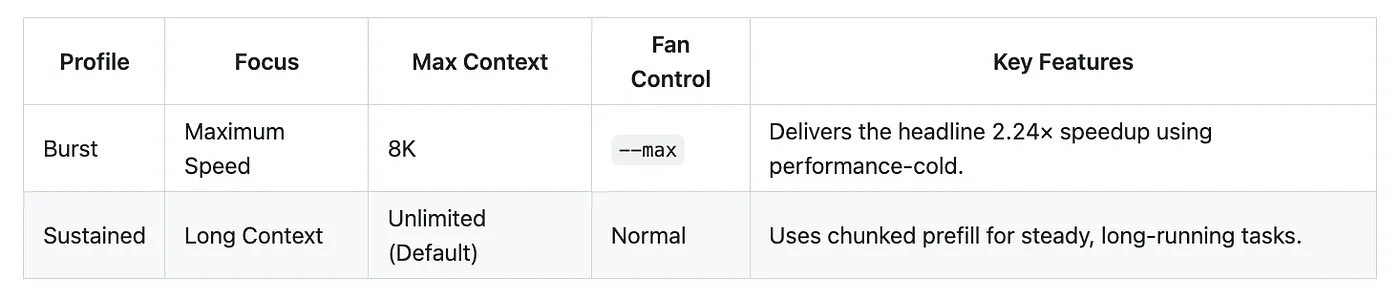
Table comparing MTPLX’s two runtime profiles: Burst for maximum single-stream speed and Sustained for long-context work.
Ultra-Optimisation (Optional Fork)
For maximum speed, MTPLX can detect an optional, custom MLX fork (mlx-mtplx-0.31.2-qmm) featuring hand-written Metal kernels:
**verify_qmv**Kernel: A small-M kernel specifically tuned for the 3-to-6 positions a verification pass actually touches.**GraphBank**: Caches compiled verify shapes, cutting capture-commit costs down to ≈0.073 ms (compared to a ≈47 ms verify pass).
⚠️ Note: This custom fork is not bundled in stock wheels. You must manually opt in.
The three, side by side
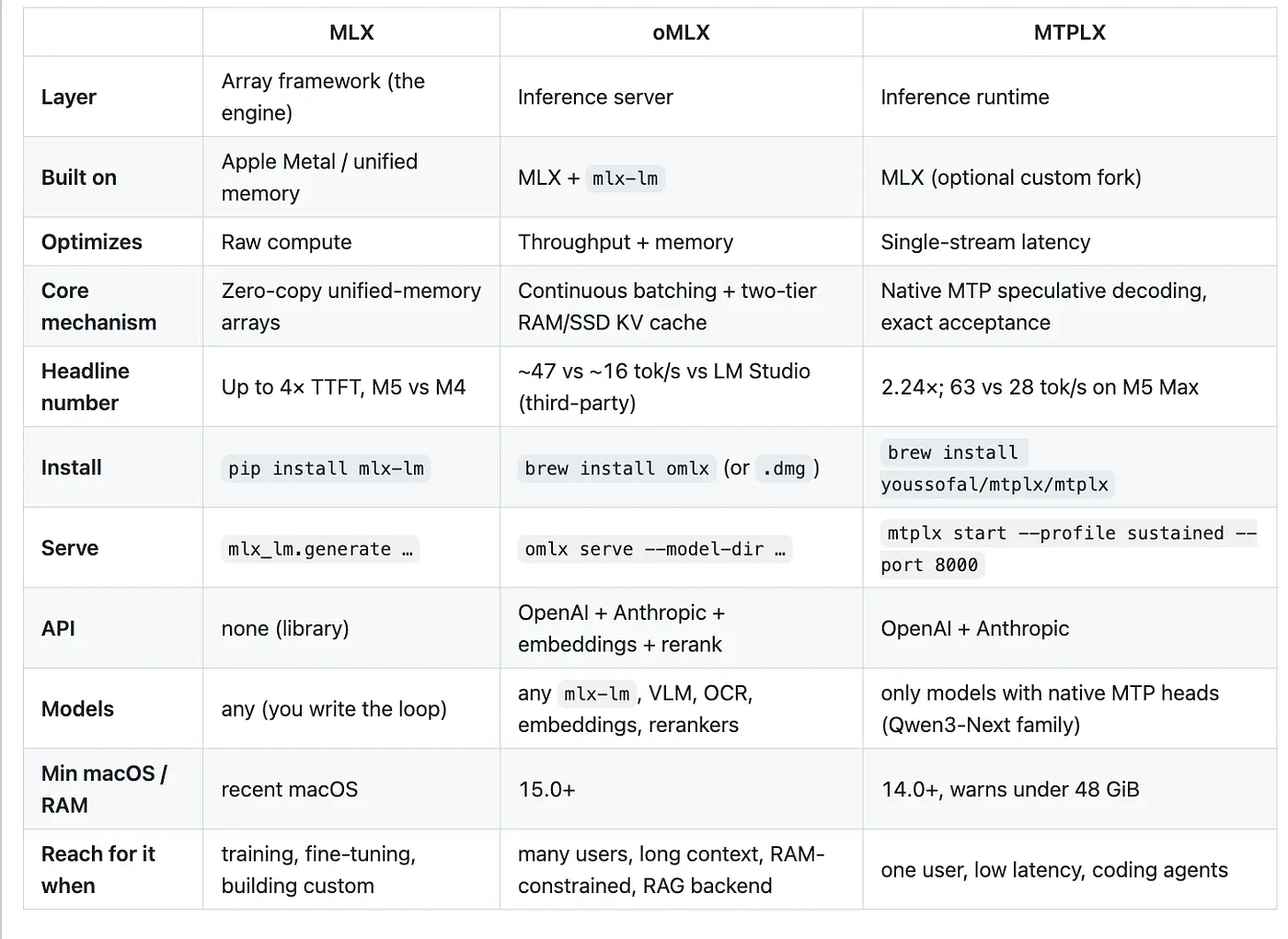
Side-by-side comparison of MLX, oMLX, and MTPLX across layer, what they optimize, core mechanism, install command, API, supported models, and when to use each.
They sit at opposite ends of the same curve
Here is the relationship the naming collision buries. oMLX and MTPLX optimise opposite ends of one trade-off, and that is precisely why both deserve to exist.
The trade-off lives on a single axis: whether your chip is starved for memory bandwidth or starved for compute. At batch size one, decode is memory-bound. The GPU’s arithmetic units sit mostly idle, waiting for the next slab of weights to arrive, and there is spare compute lying around. Speculative decoding spends that spare compute: verifying K guessed tokens is nearly free because the chip was idling anyway, so MTPLX turns idle silicon into finished tokens. This is why its win is biggest on a single stream.
Now batch many users together. Their token computations pile into the same forward passes, the once-idle arithmetic units fill up, and decode crosses over from memory-bound to compute-bound. The spare capacity that made speculation free has been spent on real work for real users. Pushing concurrency through a speculative runtime and its advantage erodes because every rejected speculative token is now burning compute that someone else wanted. Meanwhile, oMLX’s batching and SSD overflow pay off more the more load you throw at them, because that is exactly when memory and scheduling become the binding constraint.
A highway makes it concrete. Adding lanes helps most at rush hour, when the road is jammed; that is oMLX. Raising the speed limit helps most at 3 a.m. on an empty road; that is MTPLX. The fast car that flies at 3 a.m. is stuck in the same jam as everyone else once traffic builds, and no amount of horsepower changes that. They are answers to different questions about the same road, and you choose by the time of day you actually drive.
This is not armchair theory. There is an open feature request on the oMLX repository, issue #1089, asking to bring MTPLX-style native MTP speculative decoding into oMLX’s batching server, citing exactly its advantages: the target model’s own MTP heads, no second draft model, probability-ratio acceptance, \~2.24× on Qwen3.6–27B.
The dream is both at once: MTPLX’s fast single-stream drafting living inside oMLX’s high-throughput, memory-aware server. They do not compose today, and the curve above is the reason it is hard rather than a missing afternoon’s work: a speculative tree per request fights for exactly the compute that batching is busy handing to other requests, so the naive combination can make a loaded server slower, not faster. That smart people are asking for it anyway is the cleanest possible proof these were never competitors.
Benchmarking these three without fooling yourself
Most local-LLM benchmarks are wrong in the same way. Someone runs one short prompt, once, on a freshly started server, and reads the first tokens/sec off the screen. That number is mostly measuring Metal kernel compilation and an empty cache. It has almost nothing to do with the speed you will live with all day, and it is the number that gets screenshotted and posted. Six rules keep you honest, and every one of them maps to a knob these tools already give you.
- Separate prefill from decode. Time-to-first-token measures the prefill pass over your whole prompt, which is compute-bound. Generation tokens/sec measures decode, which is memory-bound. They are different physics, and a tool that blends them into one number hides which one your workload actually stresses. For Q&A over a 50-page PDF, prefill dominates and TTFT is the number that matters; for a chatty agent, decode dominates. oMLX’s admin benchmark reports prefill (PP) and generation (TG) separately for exactly this reason. Read both.
- Benchmark at the batch size you actually run. The curve above is not academic here. MTPLX’s 2.24× is a batch-one number, measured when the chip had spare compute to spend on speculation. oMLX’s batching wins only appear under concurrency. Measuring MTPLX at batch one and oMLX at batch sixteen and putting the two side by side is comparing answers to different questions. Decide your real concurrency first, then measure there: drive oMLX with
— max-concurrent-requestsset to your true load, and drive MTPLX as the single stream it was built for. - Warm up, then measure steady-state, and measure cold-start as its own number. Throw away the first few runs; they pay for kernel compilation and an empty KV cache. Report p50 and p99 of the steady state, because a clean p50 with an ugly p99 still feels janky to a user. Then, if you launch the tool fresh each time, measure that cold start separately, because a 20 ms steady state behind a 400 ms cold start feels like a 400 ms tool. Both servers change the cold story deliberately: oMLX’s SSD tier restores a matching prefix from disk after a restart instead of recomputing it, and MTPLX’s GraphBank caches compiled verify shapes so the capture-commit costs ≈0.073 ms instead of recompiling.
- Fix your sampling settings and publish them. Speedups move with temperature because the acceptance rate moves with temperature. A speculative benchmark run at temperature 0 flatters itself, since greedy decoding is where acceptance is highest. MTPLX’s headline uses temperature 0.6, top_p 0.95, top_k 20, which is why it is an honest coding-assistant number rather than a greedy demo. Run
mtplx tune — model … — retuneto see AR, D1, D2, and D3 next to each other, and flip{“generation_mode”:”ar”}per request to A/B speculation on and off against the identical prompt. - Anchor to the bandwidth ceiling. Absolute tokens/sec is bounded by memory bandwidth, 614 GB/s on an M5 Max and a good deal less on a base M-series chip. Someone else’s M5 Max number is an upper bound for your M2, not a target you are failing to hit. Either normalise by hardware or do not compare across machines at all.
- Measure the whole request, not the kernel. A decode that is twice as fast but feeds the model the wrong retrieved document is not faster end to end; it is wrong, sooner. Time retrieval, reranking, prefill, and decode together, against real queries on real data, and judge the answer quality too. The fast wrong answer is the most expensive kind.
The honest benchmark is boring: steady-state, at your batch size, with your sampling, on your hardware, across your whole pipeline. Everything else is a screenshot.
A worked example: oMLX as a local RAG backend
Of the three, oMLX is the only one that provides embeddings, reranking, and chat from a single process, making it a complete retrieval-augmented-generation backend with nothing leaving the machine. Here is the whole pipeline running on one :8000:
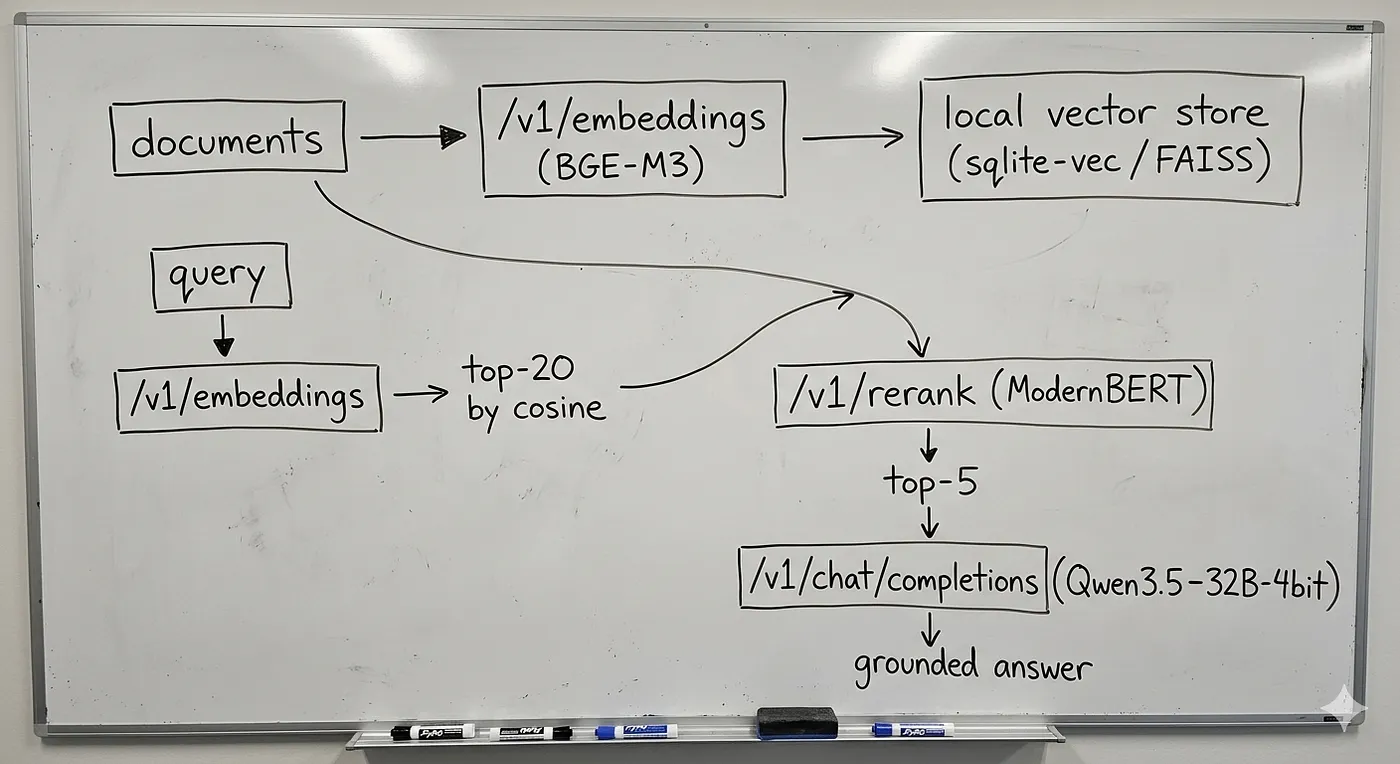
Local RAG pipeline on oMLX: documents are embedded and stored in a vector store, queries are retrieved and reranked, then chat completions produce a grounded answer, all on one localhost:8000 server.
Start the server as before, then embed your document chunks. The embeddings endpoint follows the standard OpenAI schema:
curl http://localhost:8000/v1/embeddings \
 -H 'Content-Type: application/json' \
 -d '{"model":"bge-m3","input":["text of chunk 1","text of chunk 2"]}'
Store the vectors in any local index (sqlite-vec, FAISS, Chroma). At query time, embed the question in the same way and retrieve the top 20 candidates by cosine similarity.
Then, rerank, which is the precision stage, retrieval-only pipelines skip and regret. A bi-encoder retrieval is fast but blurry: it embeds the query and the documents separately, so it never actually reads them together. A cross-encoder reranker does read each query-document pair jointly and reorders them, so the five chunks you finally stuff into the prompt are the five that answer the question, not merely the five that sound topically nearby. oMLX backs /v1/rerank with a ModernBERT or XLM-RoBERTa reranker:
curl http://localhost:8000/v1/rerank \
 -H 'Content-Type: application/json' \
 -d '{"model":"modernbert-reranker","query":"how do I rotate the API key?",
 "documents":["…candidate 1…","…candidate 2…"],"top_n":5}'
Confirm the exact field names against oMLX’s admin docs before you wire it in; the shape above follows the common rerank convention, but treat it as illustrative rather than copy-paste-final. Finally, generate the grounded answer with the reranked context in the system prompt:
curl http://localhost:8000/v1/chat/completions \
 -H 'Content-Type: application/json' \
 -d '{"model":"qwen3.5–32b-4bit","messages":[
 {"role":"system","content":"Answer only from the provided context.\n\nCONTEXT:\n<top-5 reranked chunks>"},
 {"role":"user","content":"how do I rotate the API key?"}]}'
Now the part that ties back to the cold cache, and it is the reason oMLX is a good fit for this and not just a convenient one. In a RAG app, the system prompt and often a shared document preamble repeat on every turn and across every user. oMLX’s prefix sharing computes that repeated prefix once, keeps it hot in RAM, and spills it to SSD when memory tightens, restoring it on the next matching request instead of recomputing it. The instructions and pinned context that never change stop costing prefill after the first hit, which is exactly the part of a long RAG prompt that would otherwise wreck your TTFT.
One split worth knowing: if you are the only user, you can point the final chat step at MTPLX for its 2.24× single-stream decode and leave embeddings and reranking on oMLX. For a multi-user RAG service, one oMLX instance handling all three is the simpler choice, and the memory-limit and LRU eviction controls keep the three model types from starving each other.
The gotchas that will actually bite you
Each of these has a sharp edge the marketing copy rounds off. Walk in knowing them.
MTPLX only helps models with native MTP heads. The 2.24× is real, but it lives on the Qwen3-Next family; the one tier-1-verified model today is the tuned Qwen3.6–27B. Architecturally-compatible models like DeepSeek V3.2 or GLM-4 MoE need an explicit — unsafe-force-unverified flag, and a model with no MTP head at all (most of the Hub) gets you zero speedup. Run mtplx inspect <model> before you get attached.
The headline MTPLX number is a Burst-lane number. Burst (performance-cold + — max, fans pinned at 100%, is loud and capped at 8K context. Long-context work runs on Sustained, which is slower and quieter. Do not promise yourself 2.24× on a 100K-token document.
oMLX’s cold cache only pays off on prefix reuse. The SSD tier restores blocks for a matching prefix; the first time you see a prompt, it is recomputed like anywhere else. The win is in repeated system prompts, multi-turn chats, and shared RAG context, not in one-off prompts.
The 47-vs-16 oMLX number is a third-party review, not a repo benchmark. Treat it as indicative. Use the built-in PP/TG benchmark on your own model before quoting it to anyone.
Everything rests on MLX, so version skew bites. Both servers track MLX, and MTPLX even ships a custom MLX fork for its fast lane. A mismatched mlx in your environment is the first thing to check when something behaves oddly; mtplx doctor — json and oMLX’s admin panel both exist for this.
All three are Apple-Silicon-only, by design. MTPLX states it plainly: no Linux, no CUDA, “for that, use vLLM.” If your deployment target is a cloud GPU, none of these three is your answer, and that is not a flaw; it is the entire premise.
RAM floors are real. MTPLX warns below 48 GiB of unified memory and refuses past 80% utilization; oMLX wants macOS 15. A 16 GB MacBook Air is not the machine these were tuned on.
Which one do you actually want?
Strip the names away, and the decision is short.
If you are building, training, or fine-tuning, or you want low-level control over the generation loop, use MLX directly through mlx-lm. Everything else here is downstream of it, and for custom work, the abstraction the servers add is something you would only have to fight.
If you are standing up a local server for more than yourself, want a clean menu-bar experience, need to run a model that barely fits in RAM, expect long contexts or concurrent users, or want one backend for chat plus embeddings plus reranking plus OCR, reach for oMLX. Its entire reason to exist is to flow under pressure, and the SSD cold tier earns its keep the moment your contexts get long or your prompts repeat.
If you are one developer driving a coding agent on a model with native MTP heads and you want answers back fast, run MTPLX, point Claude Code at it http://127.0.0.1:8000/, and feel the difference a 2.24× single-stream decode makes when you are the only one waiting. Lossless speculative decoding at real temperatures is the win a single interactive user feels most, every keystroke.
Three names that look like typos of each other turn out to be a stack, not a menu. MLX is the engine. oMLX is the engine arranged to feed a crowd. MTPLX is the engine arranged to sprint for one. The only real question was never which is best; it was which wall you are standing in front of, and now you can read the wall.
Some related articles you might like:
KV Cache in LLMs and How It Affects Inference
When a transformer generates the 1,000th token of a response, it has technically already done 99.9% of the work needed…
Run 32B Models on Your Mac With 5x Less Memory: Google’s TurboQuant Hits Apple Silicon
A tweet from Prince Canuma sits at 719,000 views. Posted March 25th: “Just implemented Google’s TurboQuant in MLX and…
How Flash-MoE Runs a 397B Model on a MacBook With 48 GB of RAM
How a VP of AI built a 7,000-line C engine that runs Qwen3.5-397B on a MacBook with 48 GB RAM - no cloud, no GPU…
Happy Coding ❤